
Choose by fabric
When the fabric name is unclear, choose by behavior: stretchy, slick, plush, or woven. See the stabilizer-by-fabric guide for the starting layers.
01
T-shirts and knits
Start with stretch, visibility, and the backing that remains with the garment. Add a topping only when the surface needs it.
Read the knit guide02
Towels and fleece
Separate the support beneath the item from the layer that keeps loops or nap out of the stitch path.
Read the towel and fleece guide03
Finished caps
The PE800 and SE700 do not list a Brother cap frame. A flat patch stays inside the normal field.
Read the cap limits04
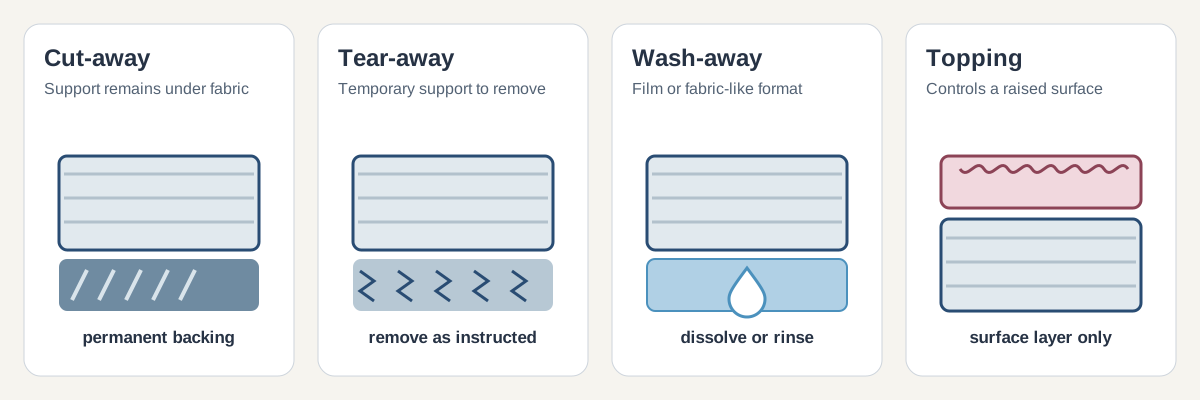
Stabilizer roles
Use the main guide when the fabric, design density, and removal method are not yet clear.
Open the stabilizer guideChoose by project or hooping problem
For infant knits, see the baby onesie and bodysuit guide.
For slick synthetics and piqué polos, read the performance polo setup guide.
For canvas, denim, totes, and aprons, read the woven-item project guide.
Project
Sweatshirts and hoodies
Match backing and any topping to the garment’s stretch, surface, and design.
Read the sweatshirt setup guideHooping
Items that are hard to hoop
Compare sticky stabilizer and temporary spray for holding an item on hooped backing.
Read the floating guideTechnique
Fabric appliqué
Keep patch adhesive separate from the backing beneath the garment and follow the design sequence.
Read the appliqué setup guideDesign
Freestanding lace
See how to support lace stitching with water-soluble stabilizer and finish the design.
Read the freestanding lace guideSize the material
Once the material is chosen, measure the full rectangle your hooping method needs. The roll-width worksheet compares full pieces, leftover area, and cost per usable cut without guessing a universal hoop margin.
Check whether a design fits
Compare a design’s measured dimensions with the usable stitching field, including a 90-degree rotation check, in the embroidery design fit calculator.
Water-soluble stabilizer and thread questions
Wash-away
Backing or topping?
Film and fabric-like wash-away products solve different jobs. Start here when the design names a water-soluble layer.
Read about water-soluble layersCompare
Simthread vs Brothread vs Brother thread
Owner reports differ. Read the discussion with its limits before choosing a spool.
Read the owner reportsChoose or check the machine
Machine
Brother model comparisons
Compare PE800 and PE900, then SE600, SE630, and SE700 by field and listed transfer features.
Open the comparison tableHoop
Hoop compatibility
Record the machine model, accessory identifier, attachment, clearance, and sewing field before buying a frame.
Open the Brother model lookup