
Embroidery stabilizer cheat sheet
Start with the row that matches the fabric or the design's main constraint. Then check the file and machine manual before you order.
| Fabric | Backing | Topping? | Removal | Skip when |
|---|---|---|---|---|
| Stable woven | Tear-away is a common start; use cut-away if the file or manual calls for permanent support. | Usually no on a smooth surface | Tear away after stitching, following the product directions | Skip tear-away when the fabric stretches or the file specifies cut-away. |
| Knit or T-shirt | Cut-away or no-show mesh; cut-away is a common starting point for wearable knits. See the knit guide | Only for ribbed, piqué, or textured surfaces that let stitches sink | Trim; backing stays with the garment | Skip tear-away as the only support for a garment that will stretch and wash. |
| Towel or fleece | Backing matched to stretch and bulk; float thick items if the manual allows it. See the towel and fleece guide | Often useful for loops, nap, or brushed fleece | Tear, trim, or rinse according to the layers used | Skip backing-only when loops or nap swallow the stitches. |
| Sheer or light fabric | Light cut-away, no-show mesh, or the exact wash-away backing named by the file | Only if the surface needs holding down | Trim or rinse according to the material | Skip visible or heavy backing when show-through or hand is unacceptable. |
| High-density design | Use the family that fits the fabric, then follow the file or manual for weight or extra support. | Only if surface texture needs control | Removal follows the backing and topping family | Skip a light single layer if a test stitch-out moves or distorts. |
These are starting points, not machine-specific requirements. BERNINA’s embroidery workbook recommends cut-away for knits and stretchy fabrics and explains tear-away and water-soluble stabilizers. Madeira’s topping guide covers fleece and terry cloth with high pile. Janome’s towel tutorial uses tear-away backing with water-soluble topping. Follow the instructions for your design and machine when they name a stabilizer.
Fabric and stitch density first
Match the stabilizer to the fabric and stitch density first: stable wovens often use tear-away or cut-away; knits usually need cut-away for support; towels and fleece may need backing plus a water-soluble topping so stitches do not sink. If the design file or machine manual names a stabilizer, follow that instruction. Ignore a convenient Amazon multipack when it conflicts with that instruction or the project's fabric. Then choose roll or precut from the hoop rectangle you actually cut, not from the product title alone.
Check the fabric and design
The fabric's stretch and surface set the support question. Stitch density can change it. If the design file or machine manual names a stabilizer, weight, or layer, use that instruction even when an Amazon multipack suggests a different combination.
For a PE800 or SE700, see the model-specific hat guidance before planning to embroider a finished cap.
For a new Brother machine, the model lookup lists the manuals and accessory checks to make before buying supplies. This chart is the better starting point when the fabric is already in front of you.
What the weight number means
Stabilizer packages list a weight such as 1.5 oz, 1.8 oz, or 2.5 oz. Within one product family, that number helps compare support. A 1.8 oz no-show mesh is built for lightness and low visibility; a heavier cut-away is built for denser designs. Weight does not make two families interchangeable: a 1.8 oz mesh and a 1.8 oz tear-away do different jobs. When the design names a weight, use it. When it does not, use the manufacturer's guidance for your fabric family.
Compare products within the same stabilizer family by weight, dimensions, and package quantity. A brand name does not establish that two products do the same job.
Once you know the type, measure the full cut your hooping method needs. If the project also needs a new frame, check the exact model's field and compatible accessories. A 5 × 7 label is not a fit promise.
Separate backing from topping
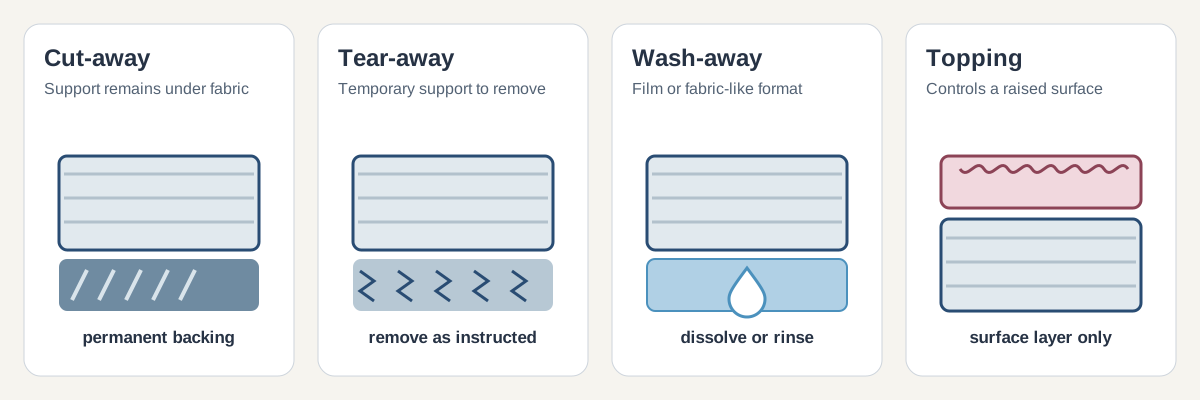
Backing supports the fabric from underneath. Topping sits above the fabric when the project calls for a surface layer. One does not automatically replace the other.
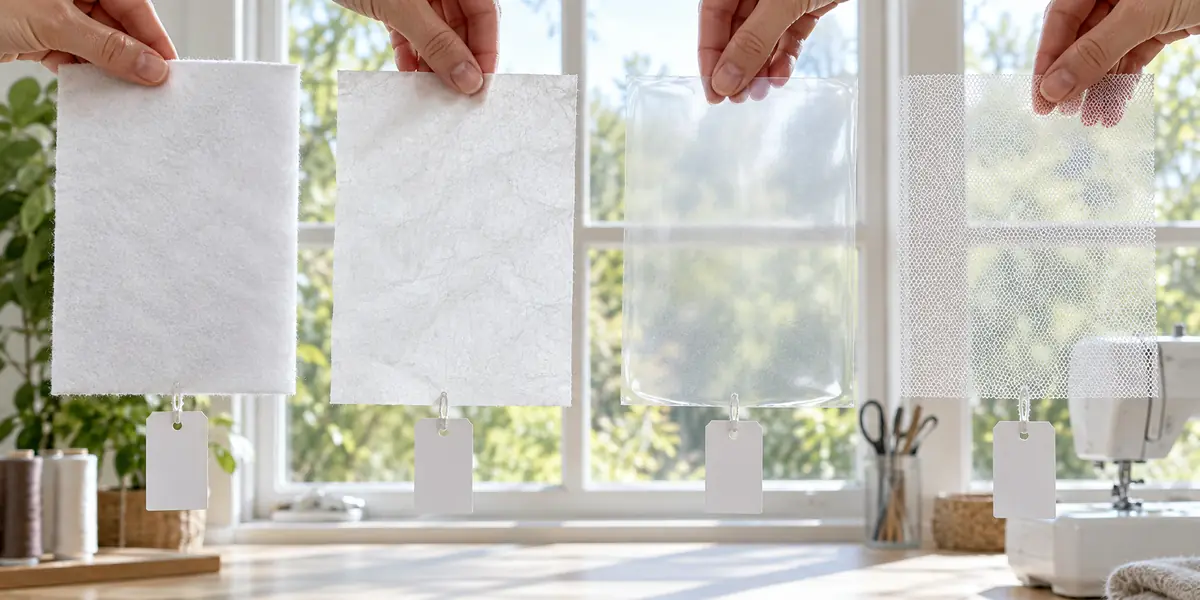
Water-soluble materials are used in more than one way. Film topping controls the surface; water-soluble backing supports a design that needs a temporary base. Sulky's freestanding-lace guidance calls for a specific heavy film. Check the exact product and the design instructions.
For designs that use a water-soluble base without a fabric foundation, see the freestanding lace setup guide.
Choose the material before the package size
Do not let a wider or cheaper roll change the stabilizer type the project needs. Once the material is settled, compare a roll with the actual cut rectangle, not the advertised sewing field alone.
A university hooping tutorial documents one method where stabilizer extends beyond the hoop. Its margin is specific to that method. An Amazon listing can show a product width, but it cannot confirm fit for your hoop and setup.
Use the roll-width worksheet for roll versus precut fit, full-piece yield, leftover area, and cost per usable cut. It handles the rectangle math; this page handles the material decision.
Check how the measurement was taken
The University of Illinois hooping tutorial documents the method described above. A listed roll width is a product specification. Neither source provides a universal cut size.
Compare package sizes after choosing the material
Follow the design file and machine manual first. Then measure the required cut and compare the number of usable pieces in a roll or precut pack with the cost calculator. It estimates material cost from your dimensions and package price; it does not rank brands or stabilizer performance.
Picks by stabilizer type
Choose by material and project first, then compare package dimensions with the cut you need. These product links are examples within each type; they do not override the design file or machine manual.
EmbroiderySetup is free and has no ads. If you buy through our Amazon links, you pay the same price and we earn a small cut, which helps keep the guides coming. As an Amazon Associate we earn from qualifying purchases.
Tear-away for stable woven fabric
Sulky Tear-Easy is a tear-away backing for stable woven projects; it removes after stitching. Limitation: it is not lasting support for stretchy garments.
New brothread 15-inch tear-away roll is a wider alternative when your cut needs extra width. Limitation: a wide roll can leave more unused material for smaller hoops.
New brothread precut tear-away sheets suit projects that fit the sheet format. Limitation: fixed sheet dimensions may not cover a larger required cut.
Light cut-away for knits and sheer fabric
Sulky Soft 'n Sheer is lightweight permanent cut-away for knit support. Limitation: backing remains in the finished item and needs trimming.
New brothread no-show mesh is an alternative for low-visibility support beneath light-colored knits. Limitation: mesh is not a tear-away and is not a universal match for dense designs.
New brothread cut-away roll is a general cut-away alternative for projects needing permanent backing. Limitation: the bulk roll may be more material than occasional projects need.
Water-soluble film for topping or wash-away work
Sulky Ultra Solvy, 12-inch roll suits topping textured fabric or designs calling for a water-soluble film. Limitation: it dissolves, so it cannot provide permanent backing.
Sulky Ultra Solvy, 8-inch roll offers the same film in a narrower width for smaller cuts. Limitation: its width may not cover a larger hooping setup.
Adhesive tear-away for floating
Sulky Sticky Plus gives a temporary adhesive surface for floating suitable fabric. Limitation: it is a specialty option, not a replacement for choosing the correct backing type.
Soft iron-on backing after stitching
Sulky Tender Touch is an iron-on backing used behind stitches to soften the inside of a finished item. Limitation: it is an after-stitch cover, not the stabilizer that supports fabric during stitching.
For the broader list of setup tools and supplies, see the full shopping list.
Common questions
What is the difference between backing and topping?
Backing goes under the fabric and supports the stitches. Topping goes over the fabric and holds a textured surface down. They solve different problems, and one never substitutes for the other.
Can I embroider without stabilizer?
Use the stabilizer named by the design file or machine manual. If neither names one, choose support for the fabric and design rather than treating a single setup as universal.
How many layers of stabilizer do I need?
Start with one layer of the type the fabric and design call for. Add support only when the design's density or the fabric's stretch gives you a specific reason - more layers are not automatically better and can stiffen the finished item.
Is cut-away or tear-away better?
Neither is better in general. Cut-away stays with the item, so it suits knits and anything that stretches or gets worn. Tear-away removes completely, so it suits stable wovens where leftover backing would show or feel stiff.
Does stabilizer brand matter?
Compare the product type, weight, dimensions, and package format. Brand names alone do not show whether two stabilizers suit the same project.